Mac OS X .pkg Uninstallation

Introduction
Implementation
Additional Panel
Conclusion
Introduction
If you have ever made distributable installer packages for Mac OS X, you, no doubt, have run into the extremely irritating problem of there being no uninstall option. As a method of by-passing this and allowing the option of being able to uninstall a package, we use a script within a package within the greater metapackage, to provide the user with an Uninstall option.
Obviously, you need the Apple Developer Tools installed, and specifically, PackageMaker.
Obviously, you need the Apple Developer Tools installed, and specifically, PackageMaker.
Implementation
So, for this example we will be using a metapackage rather than a distribution(as I originally had to support 10.3.9 and below for usage). Do the usual steps and create a metapackage, fill it with all information required - only step here is for your Contents page to look similar to this:
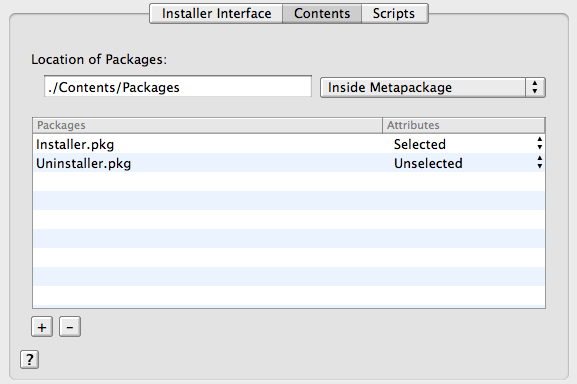
So, do the usual bit and insert your base application packages, Installer.pkg and Uninstaller.pkg, into your metapackage - for the Uninstaller.pkg, go ahead and make a new Single Package Project in PackageMaker. Fill in all your required information, such as Title, etc.. You will need to specify a Root Contents to use - go ahead and use an empty folder or any such thing. We can now Built it(it is an empty package at this point). Next, locate it in Finder, then right-click -> Show Package Contents, and navigate to Contents/Resources/. We will then want to create a textfile titled, 'postflight'. Make sure there is no .txt extension, as this will be a BASH script.
Now, inside 'postflight', we will want the following code:
WARNING: Be very careful with this, as you can easily destroy the user's system if you specify an incorrect path!
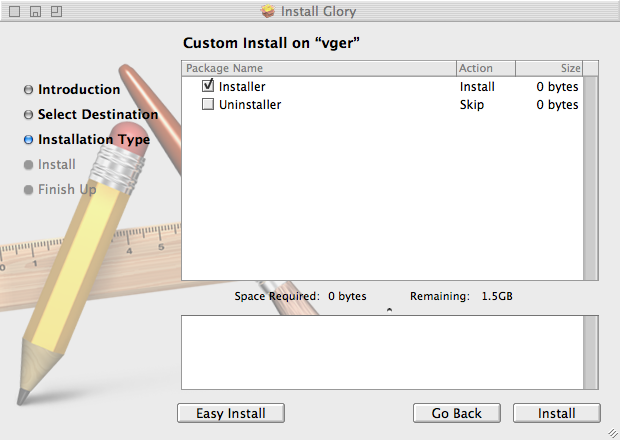
The end result should be that when you run the main .mpkg installer, the user will be able to go to Customize under Installation Type, where they can select the Uninstall option:
And, just in case I have managed to be completely unclear, here is an archive containing the .pmproj(s) for the metapackage and the uninstaller, as well as the empty archive, just for kicks.
pkguninstaller.zip
So, do the usual bit and insert your base application packages, Installer.pkg and Uninstaller.pkg, into your metapackage - for the Uninstaller.pkg, go ahead and make a new Single Package Project in PackageMaker. Fill in all your required information, such as Title, etc.. You will need to specify a Root Contents to use - go ahead and use an empty folder or any such thing. We can now Built it(it is an empty package at this point). Next, locate it in Finder, then right-click -> Show Package Contents, and navigate to Contents/Resources/. We will then want to create a textfile titled, 'postflight'. Make sure there is no .txt extension, as this will be a BASH script.
Now, inside 'postflight', we will want the following code:
postflight
#!/bin/bash

if [ -d '/Location/Where/Your/ApplicationIs' ]; then
	rm -rf "/Library/Where/Your/ApplicationIs"
	rm -rf "/Library/Receipts/Installer.pkg"
	rm -rf "/Library/Receipts/Uninstaller.pkg"
fi
What this does is delete your application(however, this will differ greatly depending on where your installer puts files - just have the installer rm -rf whatever directories/files are installed), then delete the Installer Receipts for both the Installer.pkg and the Uninstaller.pkg.
WARNING: Be very careful with this, as you can easily destroy the user's system if you specify an incorrect path!
The end result should be that when you run the main .mpkg installer, the user will be able to go to Customize under Installation Type, where they can select the Uninstall option:
And, just in case I have managed to be completely unclear, here is an archive containing the .pmproj(s) for the metapackage and the uninstaller, as well as the empty archive, just for kicks.
pkguninstaller.zip
Additional Panel
The one caveat about this solution is that when the uninstaller package is installed, the Finish Up panel incorrectly states, "The software was successfully installed" - even though nothing is being installed. This was never enough of a problem for me to warrant creating some sort of work-around, however I received an inquiry about this issue, and of if there was some way to provide a more accurate uninstall message. As far as I can tell, it does not seem possible to change the default installation success message, at least not through localization, however, upon thinking about it, it seems that two possible solutions do exist.
The first of these is to create a postflight script which closes down the Installation window and presents a simple dialog notifying the user that the application has uninstalled. However, even though this solution does have its merits, in that it is highly customizable through Applescript and otherwise, it is problematic in that it breaks the standard Installation GUI in creating an isolated dialog.
The second solution is far more suitable, in that it adheres(for the most part) to the Installation GUI standards - the only downfall is that it requires at least Mac OS 10.4 due to it being a Installer Plugin. What this solution does is create an additional installation step which displays the text "The software was successfully uninstalled," as can be seen in the following screenshot:
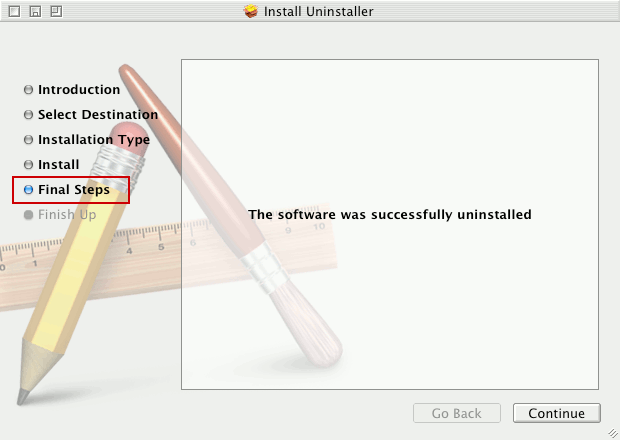
One thing to note with this solution is that it creates an additional step which reads "Final Steps" or something similar - ideally it would replace the "Finish Up" step, but due to how the Installer Plugins are managed, it does not seem possible. An additional issue is that in that uninstaller pane, the button's string is "Continue" instead of the more fitting "Close". As far as I can tell from reading various documentation pertaining to InstallerPanel/etc., this button cannot be accessed to allow its content to be changed. I may be mistaken in this regard, but given the lack of clear documentation available to me on how exactly Installer Plugins work, it seems to be as such. Finally, although I believe this could be fixed, the uninstall message is currently hardcoded into the nib file, rather than being dynamically generated from a Localization file.
Regardless of these issues, however, this solution does provide a more fitting end-user experience, in that it provides the proper uninstall message. Now, in regards to the actual implementation of this solution, provided is both my compiled Installer plugin which can be inserted into a metapackage, as well as the Xcode project source for the plugin:
compiled uninstaller Plugin bundle - get me if you just want to get it working without compiling.
uninstallerPlugin Xcode project - get me if you are curious and/or need to modify/compile it yourself.
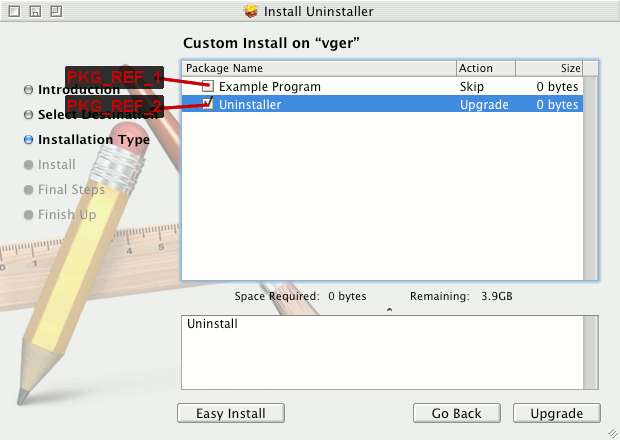
The next step is to access your metapackage's "Contents/Info.plist" file and add an Array property titled "IFPkgFlagUninstallList". You will then want to add a String property to that Array with the PKG_REF of your uninstaller package. Acquiring the PKG_REF of your uninstaller package is fairly simple, as it relies on the position of the uninstaller package in the install list. That is to say, the first package in the list is "PKG_REF_1", the second package is "PKG_REF_2", and so on (to note, "PKG_REF_0" is the metapackage itself) - if this is not immediately clear, the following image should, hopefully, explain it better:
Now that you have the proper PKG_REF for your uninstall package, you can add it as a new String property to the IFPkgFlagUninstallList array - note that you can have more than one uninstall package by simply adding another String property to the array(just remember to specify the proper PKG_REF). Your metapackage's Info.plist should look similar to the following:
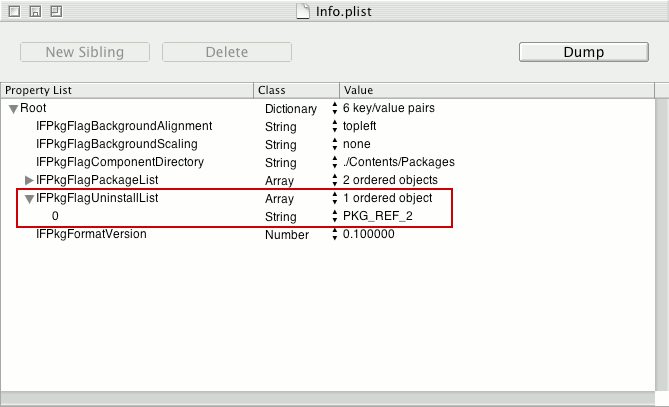
Now that you have everything in place and your uninstall package(s) specified, your metapackage should now display the uninstall panel when you select an uninstall package, and if one is not selected, the default "successful installation" panel should come up.
As a final note in regards to this solution, if you have any better alternative or improvements to the plugin, please contact me so I can either point people in the right direction or implement whatever code changes you may have.
The first of these is to create a postflight script which closes down the Installation window and presents a simple dialog notifying the user that the application has uninstalled. However, even though this solution does have its merits, in that it is highly customizable through Applescript and otherwise, it is problematic in that it breaks the standard Installation GUI in creating an isolated dialog.
The second solution is far more suitable, in that it adheres(for the most part) to the Installation GUI standards - the only downfall is that it requires at least Mac OS 10.4 due to it being a Installer Plugin. What this solution does is create an additional installation step which displays the text "The software was successfully uninstalled," as can be seen in the following screenshot:
One thing to note with this solution is that it creates an additional step which reads "Final Steps" or something similar - ideally it would replace the "Finish Up" step, but due to how the Installer Plugins are managed, it does not seem possible. An additional issue is that in that uninstaller pane, the button's string is "Continue" instead of the more fitting "Close". As far as I can tell from reading various documentation pertaining to InstallerPanel/etc., this button cannot be accessed to allow its content to be changed. I may be mistaken in this regard, but given the lack of clear documentation available to me on how exactly Installer Plugins work, it seems to be as such. Finally, although I believe this could be fixed, the uninstall message is currently hardcoded into the nib file, rather than being dynamically generated from a Localization file.
Regardless of these issues, however, this solution does provide a more fitting end-user experience, in that it provides the proper uninstall message. Now, in regards to the actual implementation of this solution, provided is both my compiled Installer plugin which can be inserted into a metapackage, as well as the Xcode project source for the plugin:
compiled uninstaller Plugin bundle - get me if you just want to get it working without compiling.
uninstallerPlugin Xcode project - get me if you are curious and/or need to modify/compile it yourself.
Plugin: Installation & Implementation
To use this plugin, you first need to place "uninstaller.bundle" into the "Contents/Plugins" directory within your metapackage. If the directory does not exist, create it. Now, within that same directory("Contents/Plugins"), create a text file called "InstallerSections.plist" with the following contents:InstallerSections.plist
<?xml version="1.0" encoding="UTF-8"?>
<!DOCTYPE plist PUBLIC "-//Apple Computer//DTD PLIST 1.0//EN" "http://www.apple.com/DTDs/PropertyList-1.0.dtd">
<plist version="1.0">
<dict>
	<key>SectionOrder</key>
	<array>
		<string>Introduction</string>
		<string>ReadMe</string>
		<string>License</string>
		<string>Target</string>
		<string>PackageSelection</string>
		<string>Install</string>
		<string>uninstaller.bundle</string>
	</array>
</dict>
</plist>
What this file does is specify when the Installer plugin's panel should be displayed, and in the case of this file, it comes immediately after the Install panel.
The next step is to access your metapackage's "Contents/Info.plist" file and add an Array property titled "IFPkgFlagUninstallList". You will then want to add a String property to that Array with the PKG_REF of your uninstaller package. Acquiring the PKG_REF of your uninstaller package is fairly simple, as it relies on the position of the uninstaller package in the install list. That is to say, the first package in the list is "PKG_REF_1", the second package is "PKG_REF_2", and so on (to note, "PKG_REF_0" is the metapackage itself) - if this is not immediately clear, the following image should, hopefully, explain it better:
Now that you have the proper PKG_REF for your uninstall package, you can add it as a new String property to the IFPkgFlagUninstallList array - note that you can have more than one uninstall package by simply adding another String property to the array(just remember to specify the proper PKG_REF). Your metapackage's Info.plist should look similar to the following:
Now that you have everything in place and your uninstall package(s) specified, your metapackage should now display the uninstall panel when you select an uninstall package, and if one is not selected, the default "successful installation" panel should come up.
As a final note in regards to this solution, if you have any better alternative or improvements to the plugin, please contact me so I can either point people in the right direction or implement whatever code changes you may have.
Conclusion
Obviously, this example will have to be adapted to remove whatever your package installs. As this example stands, it removes the Receipts for the Installer and the Uninstaller packages, as well as the location where Libraries were installed. So, for example, if you needed to also remove an application located in /Applications, you would simple add the following to postflight:
rm -rf "/Applications/ApplicationName.app"
0.0035548210144043 µs