REALmagic DXR3
Introduction
Driver Installation
Video/Audio Playback
Conclusion
Introduction
Why use "old" hardware such as the REALmagic DXR3?
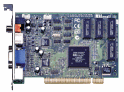
Even though the REALmagic DXR3(and other EM8300 chipset devices) came out in 1999, it can be extremely useful even now, more than ten years later. The reasons being is that the EM8300 chipset was designed to handle the standard codecs of 1999, those being MPEG-2 and MPEG-1(standard DVD formats). Now, due to the fact that these cards have MPEG-1/MPEG-2 decoding chips built directly into them, as well as having s-video and composite out, they can easily be coupled with modern hardware and its far greater processing abilities. The modern hardware can then easily transcode other video/audio formats to the codecs that the card understands, allowing the transcoded video to be immediately piped to the card, which then can display it.
In short, this means that one can use software(e.g., mplayer) to do on-the-fly transcoding of the video into MPEG format, passing the output directly to the EM8300 chip. The EM8300 chip can then easily output this to TV for instant viewing.
Even though the REALmagic DXR3(and other EM8300 chipset devices) came out in 1999, it can be extremely useful even now, more than ten years later. The reasons being is that the EM8300 chipset was designed to handle the standard codecs of 1999, those being MPEG-2 and MPEG-1(standard DVD formats). Now, due to the fact that these cards have MPEG-1/MPEG-2 decoding chips built directly into them, as well as having s-video and composite out, they can easily be coupled with modern hardware and its far greater processing abilities. The modern hardware can then easily transcode other video/audio formats to the codecs that the card understands, allowing the transcoded video to be immediately piped to the card, which then can display it.
In short, this means that one can use software(e.g., mplayer) to do on-the-fly transcoding of the video into MPEG format, passing the output directly to the EM8300 chip. The EM8300 chip can then easily output this to TV for instant viewing.
Driver Installation
Thankfully, there is an open-source project that provides drivers for the dxr3. Thanks to their work, it is very quick and fairly easy to get the card working under Linux. Their page is located at http://dxr3.sourceforge.net/.
The only downfall is that one needs to compile the driver as module, which will require the sources to your kernel.
First of all let us download the source code, located here. Be sure to check the dxr3 homepage for the latest drivers, of course, as this is linked to release 0.18.0-rc2.
Once it is unpacked(i.e., tar -zxvf em8300-0.18.0-rc2.tar.gz), from a terminal, go into the em8300 source directory. From there you will want to edit "modules/Kbuild" and make the following changes:
Our next step will be to create the device files, which is easily accomplished with the following commands(issued as root):
The only downfall is that one needs to compile the driver as module, which will require the sources to your kernel.
First of all let us download the source code, located here. Be sure to check the dxr3 homepage for the latest drivers, of course, as this is linked to release 0.18.0-rc2.
Once it is unpacked(i.e., tar -zxvf em8300-0.18.0-rc2.tar.gz), from a terminal, go into the em8300 source directory. From there you will want to edit "modules/Kbuild" and make the following changes:
modules/Kbuild
On line set 29 "-DEM8300_VIDEO_MODE_DEFAULT=" to either

	-DEM8300_VIDEO_MODE_DEFAULT=EM8300_VIDEOMODE_NTSC

or, if you live in Europe or another location that uses PAL,

	-DEM8300_VIDEO_MODE_DEFAULT=EM8300_VIDEOMODE_PAL
Now you should be ready to compile and install. Just go to the base of the em8300 source directory and issue the following commands:
make config ; make dep; sudo make installThe drivers should then hopefully be installed. If that step fails, be sure to either send feedback(located at the top of the page), or pester the fellows at dxr3.
Our next step will be to create the device files, which is easily accomplished with the following commands(issued as root):
root@rage:~# mknod /dev/em8300-0 c 121 0
root@rage:~# mknod /dev/em8300_mv-0 c 121 1
root@rage:~# mknod /dev/em8300_ma-0 c 121 2
root@rage:~# mknod /dev/em8300_sp-0 c 121 3
We can now load the drivers by issuing the following commands(as root):
insmod adv717x.ko output_mode=svideo
insmod bt865.ko
insmod em8300.ko
Keep in mind that you can change the video output to either svideo, composite, or both(with quality loss) by changing output_mode= to either "comp", "svideo" or "comp+svideo".
Video/Audio Playback
With the driver in place we can do an immediate test by using the extract_mpeg2 command to dump mpeg-2 video directly to the video device. Please note that the .mpg you dump to the device has to be only the video stream(no audio stream).
Personally I went with mplayer, as I was having a very hard and annoying time getting either xine or vlc to play nicely. Others, however, have used xine without problems, so it is probably due to the system I was working with.
You will need to acquire the mplayer sources and compile them yourself. Once you have the mplayer sources downloaded and extracted, you can cd into the directory and issue the commands: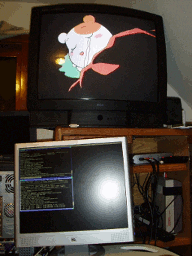
root@rage:~# extract_mpeg2 test.mpg > /dev/emu300_mv-0The screen should then turn green(it did for me) for a moment, then the video should be playing. We can now use any device that can interface with the DXR3(and even those that do not if we "dump" the streams to the devices as done prior).
Personally I went with mplayer, as I was having a very hard and annoying time getting either xine or vlc to play nicely. Others, however, have used xine without problems, so it is probably due to the system I was working with.
You will need to acquire the mplayer sources and compile them yourself. Once you have the mplayer sources downloaded and extracted, you can cd into the directory and issue the commands:
root@rage:~# ./configure --enable-dxr3
[....]
root@rage:~# make
[....]
root@rage:~# make install
If all goes well, you should have a dxr3 enabled mplayer installed into /usr/local/bin. You should be able to run non-mpeg2 video/audio by issuing the following command through mplayer(providing mplayer supports the codec(s) needed):
root@rage:~# mplayer -ao oss:/dev/em8300_ma-0 -vo dxr3 -vf lavc -framedrop NAME.AVI
Conclusion
It is easy to see that outdated hardware can still be useful, especially when coupled with modern hardware. Obviously to get the DXR3 working is far more technical than most people like to delve, but the payoffs are, as one can see, very nice and useful.
0.0019588470458984 µs